The field guide / Product packaging
QR codes for product packaging that help after the purchase
The box has limited space. Your customer’s questions do not. Use a clear, well-placed code to connect the product in their hands to the next helpful instruction.
Build your planA practical guide, with ideas to adapt to your own business.
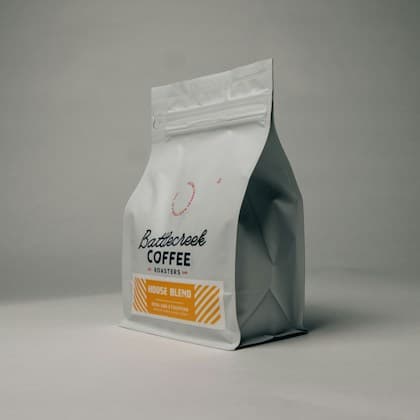
THE EVERYDAY COLLECTION
House blend
$24AUDChocolate. Hazelnut. A little orange peel.
Your new reason to get up early.
Three places to start
Box insert
Open a getting-started guide at the right moment.
Product label
Find care information without keeping the whole box.
Shelf card
Explore product details before buying.
Choose the first question to answer
A customer assembling a lamp needs setup instructions. Someone buying a coffee blend may want brewing advice. Pick that specific job before choosing a page format. A Product page can introduce the item, while a Video or PDF destination can give more detailed instructions.
Use the same product name and model identifier on the packaging and the destination. A generic brand homepage creates extra work precisely when someone is looking for help with a specific purchase.
Match the destination to the product version
Create separate codes when different models require different instructions. Updating a dynamic destination is useful for correcting a guide, but do not replace instructions for an older product with incompatible instructions for the latest model.
Keep the required safety and regulatory information on the physical product or packaging where applicable. Supplement it with digital help rather than assuming a working phone and internet connection will always be available.
Test the material your customer will hold
Curved containers, reflective wrappers and small labels need a physical test. Print the actual artwork on the intended material, then scan it with several phones from a natural holding position. Avoid putting the code across a fold, seam or tear strip.
Plan who maintains the destination over the product’s useful life. Dynamic codes depend on an active service, so include that ongoing ownership in the packaging decision. A fixed link to a stable help page may be enough when you control the page long-term.
Questions worth settling first
Will a QR code track an individual item?
A shared packaging code identifies the destination you chose. It does not automatically provide item-level traceability, authenticity checks or inventory tracking.
Can I replace an instruction file later?
A dynamic destination can be updated after printing. Keep the replacement relevant to the original product and verify that existing printed codes open the correct version.
Put the guide into practice
Start with one useful destination.
Create and customise a static QR code, then sign up or log in to download it for free. Need to edit after printing? Explore dynamic codes with a seven-day Business trial, no card required. An active plan is needed to keep dynamic codes running after the trial and grace period.